Alexa for Shopping Adds 100+ Actions: Skip Subscribe & Save, Track Refunds, Edit Delivery Notes
Alexa for Shopping now skips Subscribe & Save deliveries, tracks refunds, edits delivery instructions and manages lists in the US. Phrases and tips.
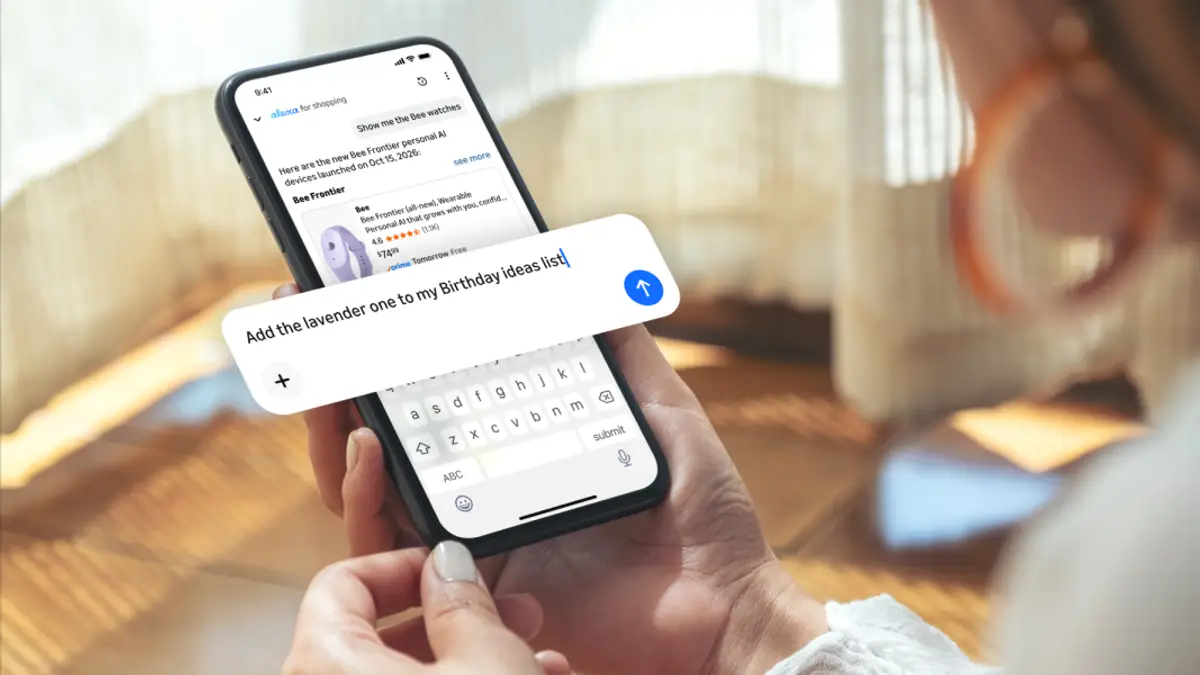
Amazon's AI shopping assistant, Alexa for Shopping, can now handle more than 100 everyday account tasks just by asking — skipping or pausing a Subscribe & Save delivery, changing delivery instructions, building wish lists and registries, checking a gift card balance, tracking a refund, or flagging a charge you don't recognize. Amazon announced the update on October 29, 2026, and says it's available now to all US Amazon customers in the Amazon Shopping app (tap the Alexa icon) and on Amazon's desktop site.
Here's what the new actions actually do, the exact phrases Amazon suggests, how this differs from Alexa+ on your Echo, and the questions you should ask before letting an AI touch your account.
What is Alexa for Shopping?
Alexa for Shopping is the assistant built into Amazon's store. It's the successor to Rufus: on May 13, 2026, Amazon combined Rufus's product knowledge with Alexa+ personalization and relaunched it under the Alexa for Shopping name. Amazon says it's available to US customers in the Amazon Shopping app, on the website and on Echo Show devices, and that it requires no Prime membership or Echo device.
Until now it was mostly a research and deals tool: compare products, check up to a year of price history, set "Update Me When" alerts, or auto-buy something when it hits a target price. The October update adds the boring-but-useful part — managing your account. Amazon says more than 400 million customers have used Alexa for Shopping in the last 12 months, and that use of its agentic features has grown more than eight times since the start of 2026.
What are the 100+ new Alexa for Shopping actions?
Amazon hasn't published the full list of 100+ actions. It grouped the examples into five buckets, with sample phrases you can type or say:
| Category | What it can do | Example phrases (from Amazon) |
|---|---|---|
| Lists and registries | Create and edit lists, move items between them, manage baby and wedding registries | "Create a new shopping list" · "Add all to my baby registry" · "Show me what's left on my wedding registry" |
| Subscribe & Save | Skip, pause or change delivery frequency | "Skip my next delivery" · "Pause my subscription" · "Change my delivery to every three months" |
| Prime and memberships | Explain benefits, show savings, check renewals | "What are my Prime benefits?" · "How much have I saved with Prime this year?" · "When does my Audible subscription renew?" |
| Delivery instructions | Add or change instructions on saved addresses | "Change the delivery instructions on my account" · "Add delivery instructions on my Palo Alto address" |
| Payments and billing | Investigate charges, view gift card balance, check refunds | "I have an unrecognized charge on my account" · "Show my gift card balance" · "Where is my refund?" |
"Our vision for Alexa for Shopping is to make every part of shopping as convenient as possible," Rajiv Mehta, Amazon's vice president of Conversational Shopping, said in the announcement. "And this is just the beginning."
How do I use Alexa for Shopping to manage Subscribe & Save?
- Open the Amazon Shopping app (US account) and tap the Alexa icon. On desktop, look for Alexa for Shopping at the top of the page.
- Type or say what you want — for example, "Skip my next delivery" or "Change my delivery to every three months."
- If you have several subscriptions, be specific: name the product ("Skip my next coffee pod delivery").
- Read the confirmation before you leave the chat, then double-check the item on your Subscribe & Save page under Your Account. Until you've seen how reliably it handles your account, treat the chat as a shortcut, not the record.
The same pattern works for the other categories: open the assistant, describe the task in plain language, confirm, then verify.
Can Alexa for Shopping track my refund or a charge I don't recognize?
Yes — Amazon lists "Where is my refund?" and "I have an unrecognized charge on my account" among the new actions. This is likely to be the most-used feature during the holidays, especially with Amazon's extended holiday return window running to January 31, 2027 for many items.
Amazon doesn't say whether the assistant can open a dispute or only explain the charge. For anything involving money, the safest flow is: ask Alexa for Shopping what the charge is, and if it still looks wrong, go to Your Orders or Amazon customer service to resolve it. Also remember the answers are AI-generated: Amazon's own screenshots of the assistant show the disclaimer that it "may not always get things right."
Use the assistant to spot fake "Amazon" messages
Holiday season is peak season for scam texts claiming to be from Amazon. Amazon separately says Alexa for Shopping can help you verify whether a message really came from Amazon. Combined with signing in with a passkey (see our Amazon passkey setup guide), that's a sensible pre-Black Friday security check.
Set "Update Me When" alerts for new releases
The older "Update Me When" feature pairs well with the new actions. Amazon's examples include "Update me when a new Kindle releases" and alerts for new seasons on Prime Video — handy for titles like Blade Runner 2099, which drops all eight episodes on November 25.
Does this work on Echo or with Alexa+?
Amazon's October 29 announcement only names the Amazon Shopping app and desktop site as places to "get started." Alexa for Shopping also runs on Echo Show, and Amazon says your conversations and preferences carry across Alexa and Amazon.com — but it hasn't said whether all 100+ account actions work by voice on an Echo Show or other Echo speakers. Until Amazon confirms, assume the app and website are the reliable places to use them.
Don't confuse this with Alexa+, Amazon's next-generation home assistant on Echo devices and Alexa.com. Alexa for Shopping is the assistant inside Amazon's store and is free for all US customers. The two share personalization, and Amazon is clearly moving toward one assistant — it has also announced ads and purchases inside Alexa+ conversations — but today they are different entry points. If you're shopping for an Echo to use with Alexa+, our rundown of the new Echo Show 16, Echo Dot and Echo Time covers prices.
Is Alexa for Shopping available outside the US?
Not according to Amazon. The announcement says the capabilities "are available now to all U.S. Amazon customers." Amazon hasn't announced dates for the UK, Germany, Japan, India or other stores. (One aggregator reported availability in India; Amazon's own post doesn't say that, so we're not repeating it.)
Should you use it? A quick decision checklist
| Task | Use Alexa for Shopping? | Why |
|---|---|---|
| Skip or reschedule one Subscribe & Save item | Yes | Faster than digging through the subscriptions page; easy to verify |
| Build a wish list or registry from items you're browsing | Yes | Low risk; you can edit lists afterwards |
| Check gift card balance or Prime savings | Yes | Read-only information |
| Find out where a refund is | Yes, then verify | Good for a status check; confirm in Your Orders |
| Investigate an unrecognized charge | Start here, finish with customer service | Amazon hasn't said the assistant can file disputes |
| Change delivery instructions before a big delivery | Yes, then check the address | Confirm it edited the right saved address |
| Anything involving a new payment method | Use the normal account pages | Keep sensitive changes in the standard flow until you trust it |
What are people saying?
We looked for community reaction on Reddit and forums and didn't find substantial discussion of the account-management update yet — coverage so far is from tech outlets (TechCrunch, Digital Trends) restating Amazon's announcement. Digital Trends' writer said the subscription controls were the part they found "more interesting." The questions shoppers are asking most, based on search suggestions, are whether Alexa costs a subscription, whether the Alexa shopping list syncs to the app, and why the Alexa shopping list sometimes isn't working — the last two concern the older Alexa voice shopping list, which is separate from the new lists and registries features described here.
Editor's take
This is the least flashy and most useful thing Amazon has done with its shopping assistant. Comparing products is nice, but finding the Subscribe & Save page, editing one address's delivery note, or working out where a refund went are the chores that actually waste time — and they spike in November and December. Timing it right before Black Friday on November 27 makes sense. Our caution: an assistant that can act on your account is only as good as its confirmations. Use it for quick, reversible changes and status checks, and verify anything involving money on the regular account pages.
FAQ
What is Alexa for Shopping on Amazon?
It's Amazon's AI shopping assistant in the Amazon app, website and Echo Show, which replaced Rufus in May 2026.
Is Alexa for Shopping free?
Yes. Amazon says all US customers can use it on the app and website, with no Prime membership or Echo device required.
How do I skip a Subscribe & Save delivery with Alexa?
Tap the Alexa icon in the Amazon Shopping app and say or type "Skip my next delivery," naming the product if you have several subscriptions.
Can Alexa change my Amazon delivery instructions?
Yes. Amazon's examples include "Change the delivery instructions on my account" and "Add delivery instructions on my [city] address."
Can Alexa tell me where my Amazon refund is?
Yes. Ask "Where is my refund?" in Alexa for Shopping, then confirm in Your Orders.
Can I create an Amazon wish list or registry with Alexa?
Yes. You can create lists, add items, move items between lists, and check what's left on a baby or wedding registry.
Is Alexa for Shopping available in the UK or India?
Amazon says the new actions are available to US customers; it hasn't announced other countries.
Is Alexa for Shopping the same as Alexa+?
No. They share personalization, but Alexa for Shopping is the assistant inside Amazon's store, while Alexa+ is the home assistant on Echo devices and Alexa.com.
Sources
- Amazon News — Alexa for Shopping adds 100+ new capabilities (Oct 29, 2026): https://www.aboutamazon.com/news/retail/alexa-for-shopping-new-capabilities
- Amazon News — Meet Alexa for Shopping (May 13, 2026): https://www.aboutamazon.com/news/retail/alexa-for-shopping-ai-assistant
- Amazon News — How to use Alexa for Shopping: https://www.aboutamazon.com/news/retail/how-to-use-amazon-shopping-ai-assistant
- Amazon News — When is Black Friday 2026: https://www.aboutamazon.com/news/retail/when-is-amazon-black-friday-faq
- TechCrunch — Amazon updates Alexa to help you manage shopping lists and subscriptions: https://techcrunch.com/2026/10/29/amazon-updates-alexa-to-help-you-manage-shopping-lists-and-subscriptions-and-update-delivery-instructions/
- Digital Trends — Alexa can now manage shopping lists, subscriptions, and check refund status: https://www.digitaltrends.com/computing/amazon-alexa-for-shopping-100-new-features/
Featured image: Alexa for Shopping in the Amazon Shopping app, official Amazon press image. Source