How to Text Alexa for Shopping: Sign-Up, iPhone/RCS Rules and Scam Check
Alexa for Shopping now works by text for invited US users. What it can do, iPhone and RCS requirements, how to join the waitlist and a scam checklist.
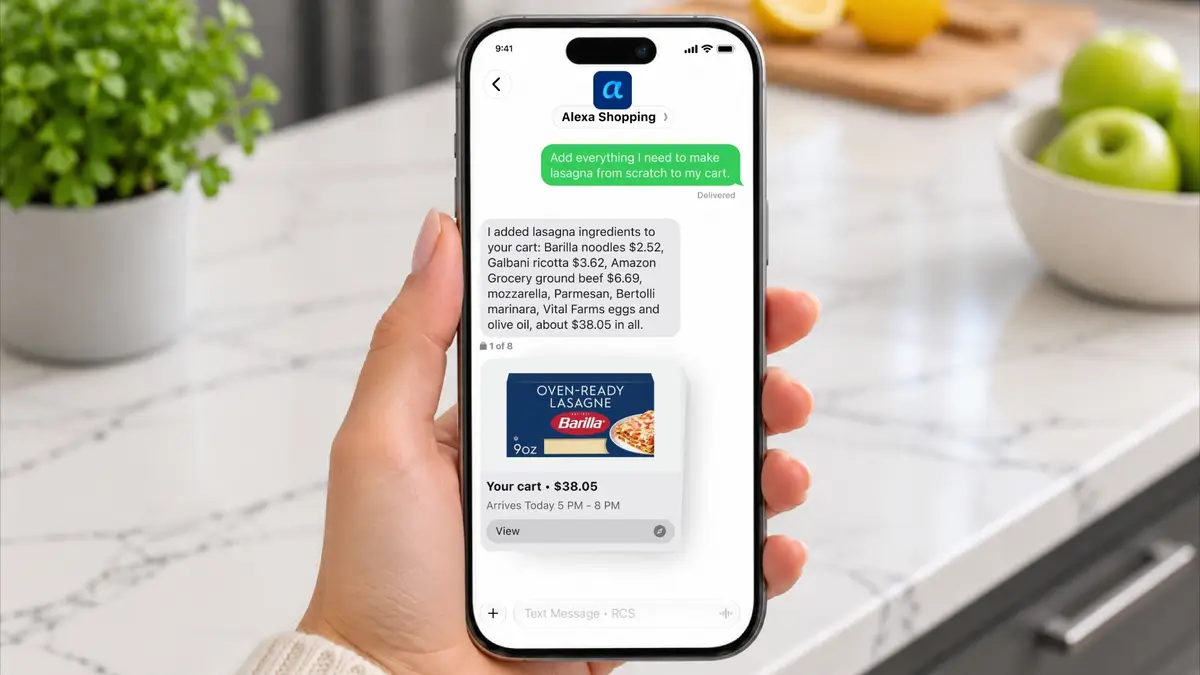
Amazon now lets some US shoppers text Alexa for Shopping like a contact in their phone. Since November 6, 2026, a small, invite-only group of US customers can send a normal text (over RCS) to a thread called "Alexa Shopping" to find products, build carts, reorder, track orders and set price alerts. Amazon says it will expand to "millions more" customers in the coming weeks; everyone else can join a waitlist at amazon.com/text-alexa-shopping.
Below: what the feature actually does, who can get it, how to sign up, the phone and carrier requirements, how to spot a fake "Alexa Shopping" text, and whether it's worth turning on.
What is "text Alexa for Shopping"?
It's a new way to reach Alexa for Shopping, Amazon's AI shopping assistant, through your phone's messaging app instead of the Amazon app or an Echo. Amazon's announcement, titled "Text, shop, done," describes it as a personal shopping agent "just a text away."
"Now with Alexa for Shopping, your personal shopping agent is just a text away," said Rajiv Mehta, vice president of Conversational Shopping at Amazon, in the company announcement.
The thread appears in your phone as "Alexa Shopping", and Amazon says conversations carry over between text, the Amazon Shopping app, Amazon.com and Alexa-enabled devices. So a cart you start by text can be finished in the app, and vice versa.
If you missed the earlier step, Amazon expanded Alexa for Shopping to more than 100 shopping actions in early November. We covered that in Alexa for Shopping's 100 new actions: Subscribe & Save, refunds and more. Texting is the same assistant in a new place.
What can you do by texting Alexa Shopping?
Based on Amazon's announcement and the FAQ on the sign-up page, here is what Amazon says the text thread can do:
| Task | What Amazon says it does |
|---|---|
| Multi-item requests | Text a whole list ("we're out of dog food and paper towels, and I need a gift for my sister") and it works through each item |
| Groceries | Text a recipe and it adds ingredients to your cart; build or change a weekly order; request same-day delivery |
| Reorders | Reorder things you bought before, "with your approval" |
| Photo search | Send a photo of a product to find similar items or reorder it |
| Preferences / memory | Remember things like "we only drink oat milk" or a child's clothing size |
| Comparisons | Compare products, e.g. top-rated robot vacuums |
| Price tracking | Show up to a year of price history and set price-drop alerts |
| New releases | Notify you about new releases from Amazon "and the wider web" |
| Account tasks | Manage lists, registries, subscriptions and your account |
| Orders | Check orders and deliveries; Amazon's FAQ says it can also cancel an order |
Amazon's own example images show the assistant replying with product cards (price, rating, delivery date) and buttons like "Buy it," and a lasagna-ingredients cart totalling about $38. Those are Amazon's demo screens, not prices we've checked.
Neither the announcement nor the FAQ mentions a fee for the texting service itself. You pay for what you buy, and normal carrier messaging rates may apply depending on your plan (Amazon doesn't say either way).
Who can use it right now?
Short answer: very few people, for now. According to Amazon's sign-up page:
- Invite-only. Amazon is sending text invitations to a subset of US customers first.
- US only. No other country is mentioned.
- Personal account. You need a personal Amazon account (not Amazon Business) with a verified mobile number.
- RCS required. Your phone must have RCS chats turned on. Amazon says most Android phones using Google Messages and iPhones on iOS 18 or later support RCS, as long as your carrier does too.
- Known exception: Google Fi on iPhone "isn't supported yet."
If you don't have an invite, the page lets you sign in to be notified as more invitations go out.
How do I sign up to text Alexa for Shopping? (step by step)
- Check RCS. On iPhone (iOS 18+), go to Settings › Apps › Messages and make sure RCS Messaging is on. On Android, open Google Messages › Settings › RCS chats. If your carrier doesn't support RCS, the feature won't work.
- Confirm your phone number on Amazon. Your account needs a verified mobile number (Your Account › Login & security).
- Go to the sign-up page. Visit amazon.com/text-alexa-shopping and sign in.
- Tap "Text Alexa" if offered, then review and accept the terms. If you're not yet eligible, join the notification list.
- Wait for the welcome text. Amazon says once you get a welcome text "you're ready to go." The thread shows as "Alexa Shopping."
- Start small. Try something low-risk first, such as "what's in my cart?" or "where's my order?", before letting it reorder or buy.
Tip: in Amazon's demo, the opening message tells you to reply HELP for help or STOP to opt out.
Is the "Alexa Shopping" text real or a scam?
This is the question we expect to explode, because scammers love any brand-new "text from Amazon." Here's a checklist built only from what Amazon has published:
| Signal | Legit Alexa Shopping (per Amazon) | Red flag |
|---|---|---|
| How it starts | You opted in on amazon.com/text-alexa-shopping, or got an invite and then accepted terms on Amazon | A surprise text claiming you've "won" access or must "verify" now |
| Channel | RCS chat named "Alexa Shopping" | Plain SMS from a random number with a shortened link |
| What it asks | Shopping requests, approvals for purchases you started | Your password, one-time code, card number or gift cards |
| Links | Leads to amazon.com | Look-alike domains (amaz0n, amazon-support-...) |
| Pressure | None described | "Your account will be locked in 24 hours" |
If in doubt, don't tap anything in the text. Open the Amazon app yourself and check Your Orders and your messages there. Never share your password or a one-time passcode in any text thread. If you're tightening account security anyway, our Amazon passkey setup guide shows how to sign in without a reusable password.
How is this different from Rufus, Alexa+ and "Buy for Me"?
Amazon now has several overlapping AI shopping tools, which is confusing. A quick map:
| Tool | Where it lives | Main job |
|---|---|---|
| Alexa for Shopping (text) | Your phone's Messages app (RCS) | Shop, reorder, track, price alerts by text |
| Alexa for Shopping (app/web) | Amazon Shopping app, Amazon.com | Same assistant; conversations sync with text |
| Alexa+ on Echo | Echo devices | Voice assistant that can also shop; Amazon is testing ads inside Alexa+ chats (our explainer) |
| Shop Direct / Buy for Me | Amazon app | Surfaces and buys items from other brands' sites (our explainer) |
The text channel's selling point is friction: no app to open, no voice to use in public. It also matters that Amazon says the assistant can notify you about new releases "from Amazon and the wider web," which hints it isn't limited to Amazon's own catalogue for discovery.
Why is Amazon doing this now?
Amazon hasn't said beyond the announcement, but the timing is notable: it's right before the Black Friday 2026 sale window and Cyber Monday, when price alerts and quick reorders are most useful.
Industry analysts see a strategic angle. Scot Wingo, who writes the Retailgentic newsletter, called the text launch a sign that Amazon is moving from "offense" to "defense" in agentic commerce, arguing that personal AI agents could otherwise capture orders before shoppers ever think of Amazon (Retailgentic). He also points out a consequence for sellers: in a text thread, "The consumer never sees a pdp" (product detail page), so accurate product titles and attributes matter more than ever. That's his analysis, not Amazon's.
What are people saying?
It's very early. Because the rollout is invite-only and began on November 6, we could not find Reddit or forum threads from people who have actually used the text feature yet. We won't invent reactions. The questions readers are already searching for, based on Google's autocomplete and common Alexa support topics, are:
- "Is the Alexa Shopping text legit?"
- "How do I get an invite to text Alexa?"
- "Does it work on iPhone?" (yes, iOS 18+ with RCS and a supporting carrier, per Amazon)
- "Can I text my Alexa shopping list to my phone?" (that's an older, separate list-sharing feature)
- "How do I stop Alexa Shopping texts?" (reply STOP, per Amazon's demo)
In the comments on Wingo's post, one reader focused on the seller side, saying that in a check of 30 US retail sites most brands had few ways for AI agents to read their product data. That's one commenter's spot check, not a study.
We'll update this article with real user reports once the rollout widens. (Also new for Prime members this month: seven free PC games on Luna.)
Is texting Alexa for Shopping worth it?
Editor's take: For routine reorders, order tracking and price-drop alerts, texting is the lowest-effort way Amazon has offered yet, and the "remember my preferences" feature could save real time on groceries. We'd be more careful with purchases: the convenience that makes one-text reorders appealing is also what makes accidental orders easy. Until the feature is broadly available and real users report how reliable it is, use it to build carts and get alerts, and review the cart before approving anything. And treat any unexpected "Alexa Shopping" text as suspect unless you opted in on Amazon.com yourself.
Who should try it: frequent Amazon grocery or household shoppers (see whether Amazon Grocery is worth it), deal-watchers who want price alerts, and people who dislike voice assistants.
Who should skip it for now: anyone outside the US, Google Fi iPhone users, people whose carrier doesn't support RCS, and anyone who shares a phone with kids.
FAQ
How do I text Alexa for Shopping?
Sign in at amazon.com/text-alexa-shopping. If you're eligible, tap "Text Alexa," accept the terms, and wait for a welcome text from "Alexa Shopping." Then reply with what you need. If you're not eligible yet, join the notification list.
What is the Alexa Shopping phone number?
Amazon hasn't published a number to text. The thread is created when you opt in through Amazon and appears as "Alexa Shopping." Be wary of any website or text that gives you "the Alexa Shopping number."
Is texting Alexa for Shopping free?
Amazon doesn't mention a fee for the texting service. You pay for products you buy. Amazon doesn't say whether carrier messaging charges apply, so check your plan.
Does Alexa for Shopping text work on iPhone?
Yes, on iOS 18 or later with RCS turned on and a carrier that supports RCS, according to Amazon. Google Fi on iPhone isn't supported yet.
Is Alexa for Shopping texting available outside the US?
No. Amazon says texting is invite-only and only available in the US right now. It hasn't announced other countries.
Can Alexa for Shopping buy things without asking me?
Amazon says reorders happen "with your approval," and its demo shows a "Buy it" button for you to tap. Review the cart before confirming.
How do I stop Alexa Shopping texts?
Amazon's demo welcome message says to reply STOP to opt out.
Can I send a photo to Alexa Shopping?
Yes. Amazon says you can text a photo to find similar items or quickly reorder something you're running low on.
Featured image: Amazon promotional image of the Alexa Shopping text thread on a phone (Amazon). Source
Sources
- Amazon — Text, shop, done: Alexa for Shopping is now just a text away (Nov. 6, 2026): https://www.aboutamazon.com/news/retail/alexa-for-shopping-text-to-shop
- Amazon — Shop by text with Alexa Shopping (sign-up page and FAQ): https://www.amazon.com/text-alexa-shopping
- Amazon newsroom (list of Nov. 5-6, 2026 announcements): https://www.aboutamazon.com/news
- Retailgentic (Scot Wingo) — Amazon announces AFS for Text: https://www.retailgentic.com/p/flash-amazon-announces-afs-for-text