Amazon scams this Black Friday: how to spot, verify and report fake texts, emails and calls
Amazon's 6 official scam tips, the most common fake texts and calls, a real-or-fake table, and how to report Amazon scams in the US, UK and elsewhere.
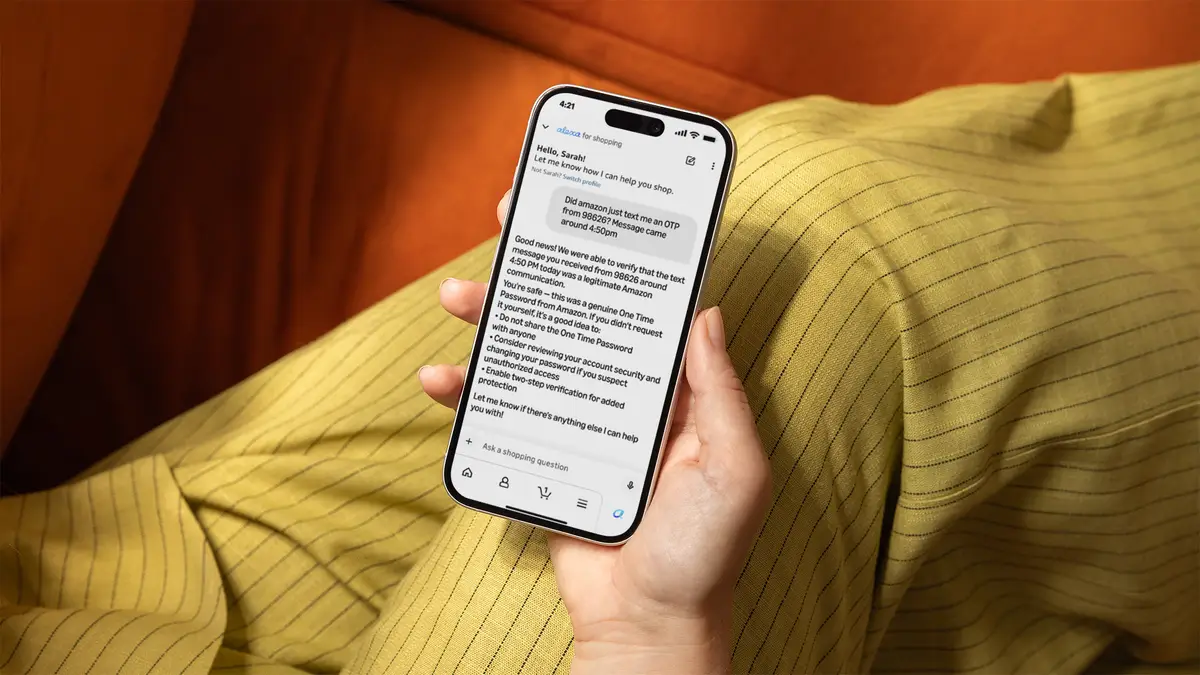
If a text, email or phone call says it's from Amazon and asks you to click a link, pay, buy a gift card, or install an app, treat it as a scam until you've checked it yourself. Open the Amazon app or type amazon.com into your browser and look at Your Orders and your messages. Anything real will be there. You can also ask Alexa for Shopping whether Amazon really sent it, or forward the message to Amazon at [email protected].
On 20 November 2026, in the middle of Black Friday Week, Amazon republished its scam-prevention guide. These fake messages tend to arrive when people are expecting real order and delivery updates. Below we cover Amazon's six official tips, the scams Amazon says are most common right now, a "real or fake?" table, and what to do in the US, UK and elsewhere if you've already clicked or paid.
What are the most common Amazon scams right now?
Amazon's US help page lists six impersonation scams it sees most:
| Scam type | What the message says | What it's really after |
|---|---|---|
| Fake order confirmation | "Your order for an iPhone/laptop has been placed. Call us if this wasn't you." | Payment details, remote access to your device, or gift cards |
| Fake tech support | A website or search ad posing as Amazon device/Prime support | Getting you to call a scammer's number |
| Prime membership | "Your Prime renewal failed" or "you owe a membership fee" | Card or bank details |
| Account suspension/deletion | "Your account will be locked unless you verify now" | Your password and payment info via a fake login page |
| Fake recall/refund | "An item you bought was recalled. Click to get your refund." | Personal and banking details. Amazon says it does not send recall text messages |
| Recruitment | Job offers sent by text or messaging app | Upfront "training" fees or ID documents. Real Amazon jobs are posted on amazon.jobs |
Amazon UK's scam-trends page gives some more recent detail. Its June 2026 entry says account-related scams (fake security alerts, suspension warnings and "login verification" requests) were the most reported tactic during the 2025 busy shopping period. Amazon UK also said phone scammers had moved towards claiming "suspicious activity" and then asking for remote access to your device. The page also documents a March 2026 wave of fake recall emails asking people to "confirm if your recall order qualifies for a refund".
How do I know if a message is really from Amazon?
Amazon's own guidance comes down to one rule: don't use anything inside the message to check the message. Don't tap its links, don't call its phone number, and don't reply to it. Use a channel you open yourself instead:
- Check Your Orders. Open the Amazon app or type amazon.com yourself. If the "order", "refund" or "delivery problem" isn't in your account, it isn't real.
- Check Message Centre. Amazon keeps copies of the emails it sends you under Your Account → Your Messages.
- Ask Alexa for Shopping. Amazon says you can ask the shopping assistant on Amazon.com or in the Amazon Shopping app whether a text, email or call came from Amazon. US users can also text Alexa for Shopping directly (see our guide to texting Alexa for Shopping and its scam check).
- Forward it to [email protected]. Amazon lists this address for people who want to check a message, including people without an Amazon account.
- Search the BBB Scam Tracker (US). Amazon suggests looking up the wording or phone number on the Better Business Bureau's Scam Tracker to see if others have reported it.
Amazon's 6 official tips, in plain English
Amazon's guide is written by Scott Knapp, the company's Vice President of Worldwide Buyer Risk Prevention. These are the six tips:
- "Verify directly through Alexa for Shopping." Use it for anything about a purchase, account problem or recall.
- "Pay only through Amazon's app and website." Amazon says it won't ask for payment by phone or email, or ask you to pay on another website.
- "Be wary of false urgency." Scammers rely on "act in the next hour" pressure. Slow down before you do anything.
- "Don't be pressured into buying a gift card." In Amazon's words: "We will never ask you to purchase a gift card, and no legitimate sale or transaction will require you to pay with gift cards."
- "Contact us." Use the app or website, not a number from a text, email or search result. Amazon says it will not ask you to install software, give remote access, or pay for customer service.
- "Check what others are saying." Use the BBB Scam Tracker.
Real or scam? A quick decision table
| You receive… | Real Amazon would… | Red flag |
|---|---|---|
| A text about a product recall | Not text you. Recalls show in your account's recall/product-safety alerts | Any recall text with a link |
| A call about a "suspicious £/$ purchase" | Never ask for remote access or gift cards | "Install AnyDesk/TeamViewer so we can refund you" |
| An email saying your account is locked | Show the same alert inside the app | Link to a login page that isn't amazon.com / amazon.co.uk etc. |
| A Black Friday "exclusive deal" link by text | List deals on its site and app | Shortened links, odd domains, prices too good to be true |
| A one-time passcode (OTP) you didn't request | Only send one when you try to sign in | Someone calling to ask you to read the code out |
| A job offer over WhatsApp/Telegram | Post jobs on amazon.jobs | Upfront payment or a "starter fee" |
How big is the problem?
Amazon's figures for 2025, from its updated guide:
- It started takedowns of more than 70,000 phishing websites and more than 14,000 phone numbers used for impersonation scams.
- 28% of the impersonation scams customers reported worldwide tried to get into customer accounts.
- Amazon says it can now take down reported phishing sites "in a few hours" and has "thousands" of people working on fraud and abuse.
Amazon UK's February 2026 review of 2025 says impersonation scams declined during 2025, with Q4 running 36% below the Q1 peak. The channel scammers use differs a lot by country, according to that page:
| Country (Amazon's 2025 data) | Main scam channel |
|---|---|
| UK | Phone 44%, email 37% |
| US | Email 40–50% |
| Japan | Email ~75% |
| Germany | Email 46%, phone 24% |
| Spain | Email 46%, phone 26% |
| Italy | Email 40%, phone 21%, SMS 19% |
| France | Email 77% |
For an independent comparison: in its most recent company ranking (published May 2024, covering 2023), the US Federal Trade Commission said consumers filed about 34,000 reports about scammers impersonating Amazon. That made Amazon the second most impersonated company after Best Buy/Geek Squad (about 52,000). We couldn't find a newer FTC company ranking.
I already clicked, paid or shared details. What now?
Act quickly, and work through this list in order:
- Hang up / stop replying. Don't argue with the scammer or "test" them.
- If you gave remote access, disconnect the device from the internet, uninstall the remote-access app, and run a security scan.
- If you entered your Amazon password, sign in by typing amazon.com yourself, change your password, turn on two-step verification, and check Your Orders, addresses and saved cards for changes. A passkey also helps (see our Amazon passkey setup guide).
- If you shared card or bank details, call your bank using the number on your card and ask it to block the card and dispute the charges.
- If you bought gift cards for a scammer, contact the gift card issuer straight away. Amazon has a dedicated gift-card scam help page.
- Report it to Amazon. Customers can use the self-service tool: Customer Service → Report something suspicious. The tool asks what you shared (nothing, account info, banking info, remote access) and gives advice for that situation. If you don't have an account, email the message as an attachment to [email protected].
- Report it to the authorities in your country:
- US: suspicious calls and texts go to the FTC at reportfraud.ftc.gov, as Amazon's help page advises.
- UK: forward scam emails to [email protected] (NCSC). If you lost money, report it via Report Fraud (reportfraud.police.uk, 0300 123 2040) in England, Wales and Northern Ireland, or call 101 in Scotland. The NCSC says it had removed 454.8k scam URLs as of July 2026.
- Elsewhere: use your national police or consumer-protection fraud line, and still report it to Amazon.
What are shoppers saying?
We looked for first-hand community reports about this week's Black Friday scams but couldn't access Reddit's r/Scams from our tools, so we aren't quoting any posts. Press coverage this year has kept returning to the same patterns. In May 2026, Fox News described a fake recall text that opens with "Dear Amazon Customer", never names the product, claims an item from a February 2026 order was recalled, links to a random-looking domain, and is signed "Amazon Account Support Team". In August, Fox News reported a fake "Amazon Remote Recruitment Team" text promising $100 to $600 a day for about an hour of work. Fox said a nearly identical offer had been logged on the BBB Scam Tracker in July.
The questions people search most, according to Google autocomplete, are: "Amazon scam calls", "Amazon scam text message", "Amazon scam email report", "Amazon scam call suspicious activity" and "Amazon scam call press 1". That last one refers to automated calls asking you to "press 1" to cancel a purchase. Amazon's advice covers it too: hang up and check your orders yourself.
Editor's take
Scam messages are getting more convincing, but the basic test still works: a real Amazon problem always shows up inside your Amazon account. If you only remember one thing from this article this Black Friday, make it that. Never use a phone number, link or code someone sends you. Amazon's 2025 numbers (70,000+ phishing sites and 14,000+ phone numbers targeted for takedown) show it's catching a lot, and its own data says reports fell through 2025. But peak shopping weeks are when people are least suspicious of a "your order is delayed" text. The Alexa for Shopping check is free and takes a few seconds, so use it.
Planning your shopping? Here are the Amazon Black Friday 2026 dates by country and when Amazon's Black Friday deals drop. Job hunters should only apply through official channels. Our Amazon holiday hiring guide explains how.
Also on 9to5Amazon today: Perfect Liars on Prime Video: release date, cast and book, and AWS spend limits explained.
FAQ
How do I report an Amazon scam text or email?
Customers can use Amazon's self-service tool (Customer Service → Report something suspicious). Anyone can email the suspicious message as an attachment to [email protected]. In the US you can also report calls and texts at reportfraud.ftc.gov. In the UK, forward scam emails to [email protected].
Does Amazon call you about suspicious activity?
Amazon says it will never ask you to install software, give remote access, pay for customer service, or buy gift cards. If a caller claims there's "suspicious activity", hang up and check your account in the Amazon app.
Is the Amazon "press 1" call a scam?
Treat any unexpected automated call asking you to press 1 about an order or charge as a scam. Hang up and check Your Orders yourself.
Does Amazon send texts about product recalls?
No. Amazon's help page says it does not send recall text messages. Real recall notices appear in your account.
How can I verify if a message is from Amazon?
Ask Alexa for Shopping on Amazon.com or in the app, forward the message to [email protected], or check Your Orders and Your Messages in your account.
What should I do if I gave a scammer my Amazon password?
Change your password straight away by typing amazon.com yourself, turn on two-step verification, review recent orders, addresses and payment methods, and report it through Amazon's self-service tool.
Will Amazon ask me to pay with gift cards?
No. Amazon says: "We will never ask you to purchase a gift card, and no legitimate sale or transaction will require you to pay with gift cards."
Are Amazon job offers on WhatsApp real?
Amazon says real job postings appear on amazon.jobs. Unsolicited offers by text or messaging app that ask for upfront payment or personal documents are a known scam.
Sources
- About Amazon: 6 tips to help you spot and avoid scams impersonating Amazon (updated 20 November 2026)
- Amazon Customer Service: Scam trends and Report a scam (Amazon help pages)
- Amazon UK: The latest scam trends from Amazon UK
- US FTC: New FTC data shed light on companies most frequently impersonated by scammers
- Fox News: Amazon recall text scam comes with red flags and Amazon job scam texts are spreading again
- UK NCSC: Report a scam email
Featured image: a phone using Alexa for Shopping to check whether a one-time passcode text came from Amazon. Amazon press photo via About Amazon. Source