Amazon Price History, Price Alerts and Auto Buy: How to Use Them for Black Friday 2026
How to check Amazon price history (up to 365 days), set price alerts and use Auto Buy before Black Friday 2026, with limits, a checklist and FAQs.
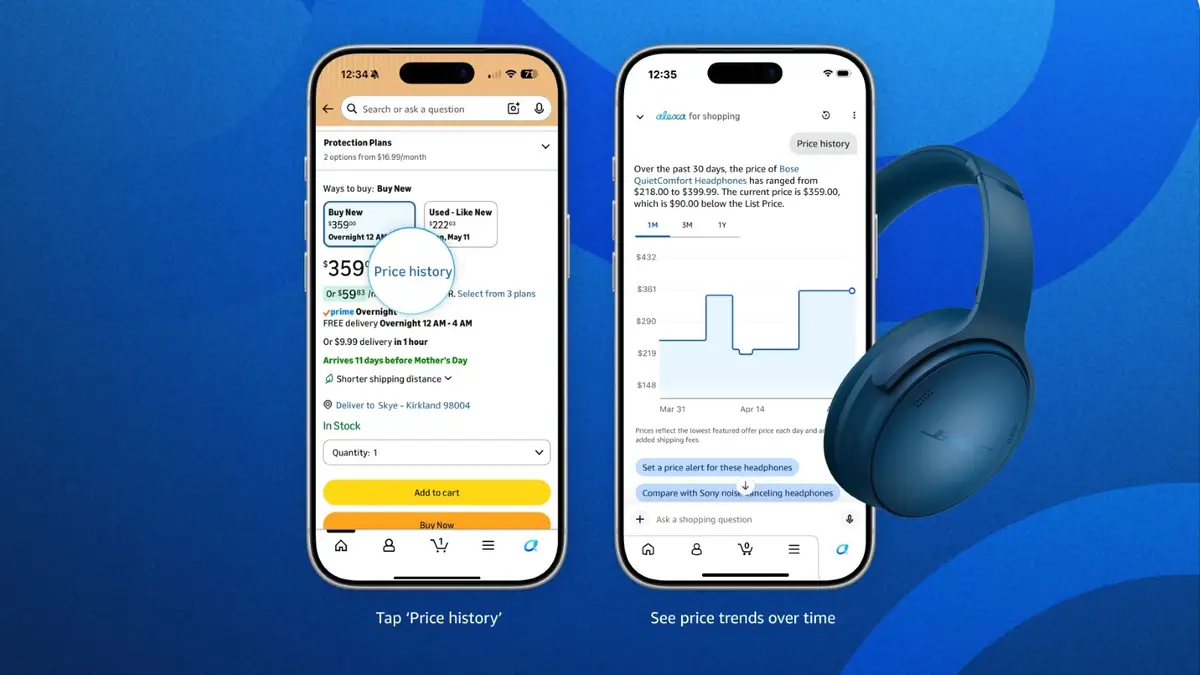
Amazon now shows up to a year of price history on hundreds of millions of products, and its AI assistant, Alexa for Shopping, can watch a price for you and even buy the item automatically when it hits your target. On a product page in the Amazon app or website, tap "Price history" to see the chart, then ask Alexa for Shopping to set a price alert or an Auto Buy. With Black Friday Week starting 19 November 2026, here's how each tool works, what the limits are, and when to use which.
Amazon refreshed its guide to these tools on 9 November 2026, ahead of the sale (About Amazon). We haven't used Auto Buy ourselves. Everything below comes from Amazon's own pages, with a few details from press and community threads that we flag as such.
What is Amazon's price history feature?
Price history is a chart of how an item's price has moved over time, built into Amazon itself. You no longer need a browser extension or a third-party tracker to see it.
- Where: On a product detail page, tap "Price history". Alexa for Shopping opens with a chart and a short summary, for example the lowest and highest price over the period and how today's price compares.
- How far back: Amazon says Alexa for Shopping shows 30-, 90- and 365-day price history (About Amazon, how-to guide). In its launch post it describes this as seeing "how the price has changed over the past year on hundreds of millions of products" (About Amazon, 13 May 2026).
- Asking instead of tapping: You can type a question such as "Has this item been on sale in the past 30 days?" or "Was it cheaper last Black Friday?"
Amazon's own screenshot shows three tabs, 1M, 3M and 1Y, plus buttons to set a price alert or compare with a similar product right under the chart.
Who gets it: Alexa for Shopping is available to all US customers in the Amazon Shopping app, on the website and on Echo Show devices, according to Amazon. The full-year view also started rolling out in the UK and India in May 2026, with shorter history windows in Canada, PPC Land reported based on Amazon's announcement. The same report says more than 50 million customers had used price history since it launched in 2024. That figure comes from Amazon and hasn't been independently checked. If you shop on another Amazon store, look for the "Price history" link on a product page. If it isn't there, the feature hasn't reached your store yet.
Quick name check: Alexa for Shopping is what used to be Rufus. On 13 May 2026 Amazon merged Rufus with Alexa+ and renamed the assistant, so older guides, forum threads and some help pages still say "Rufus". It's the same assistant (more in our Alexa for Shopping 100 new actions explainer).
How do I set an Amazon price alert?
A price alert tells you when an item drops to a price you choose. It doesn't buy anything.
- Open the product page in the Amazon Shopping app or on amazon.com.
- Tap "Price history" and choose "Set a price alert", or open Alexa for Shopping and type your request.
- Name a price: for example, "Alert me when this drops to $50."
- Alexa for Shopping checks the price for you and notifies you when the item hits your target.
You can also set a broader alert for a category rather than one product. Amazon's example is "Alert me to deals on noise-canceling headphones", which it says sends daily updates on matching deals (About Amazon). And on your Amazon Lists you can filter to "deals" to see which saved items are currently discounted.
How does Amazon Auto Buy work?
Auto Buy goes one step further: when the price reaches your target, Amazon places the order for you.
- On the product page, ask Alexa for Shopping something like "Buy these headphones when they're $75 or less" or "Buy this when it's 30% off".
- Confirm the details. Reports from when the feature launched (then under the Rufus name) describe a confirmation step where you tick an "Auto Buy" box, so it can't buy without your say-so (Modern Retail).
- Amazon watches the price. In its 2025 Black Friday post it said the assistant will "monitor prices every 30 minutes" (About Amazon).
- When the price hits your target, the order is placed with your default payment method and shipping address, and you get a notification.
What Amazon itself says about the rules (About Amazon, November 2025):
- Auto Buy is offered to Prime members.
- Requests "stay active for six months or until you cancel".
- You get "free 24-hour cancellation if you change your mind after the order is placed".
- Amazon says customers are "saving on average 20% per purchase". That's Amazon's own figure.
A Slickdeals thread from January 2026 that summarised Amazon's terms lists more limits: one unit per request, up to 200 active Auto Buy requests, Fulfilled by Amazon/Prime items only, and no coupons or promotional discounts applied to Auto Buy orders (Slickdeals). We couldn't load Amazon's Auto Buy help page to confirm these when we checked on 11 November, so treat them as reported rather than confirmed. The coupon point matters most: if a deal relies on clipping a coupon, Auto Buy may not see the price you see.
Price alert vs Auto Buy vs price history: which should you use?
This is the part most guides skip. Each tool fits a different kind of shopper and a different kind of purchase.
| Your situation | Best tool | Why |
|---|---|---|
| "Is this Black Friday 'deal' actually a deal?" | Price history (1Y tab) | Shows whether today's price beats the past year, including last year's sales |
| You want it, but not at any price, and want to decide yourself | Price alert | You get notified and can still check colour, seller or coupons before buying |
| You know the exact item and the price you'd pay, and stock could sell out | Auto Buy (Prime) | Places the order within minutes of the drop, while you're asleep or busy |
| The best price needs a clipped coupon or promo code | Price alert, not Auto Buy | Auto Buy reportedly doesn't apply coupons or promotions |
| You're buying a gift and want a few options | Category alert ("deals on…") | Daily updates across a product type, not one listing |
| You're not a Prime member | Price history + price alert | Amazon offers Auto Buy to Prime members |
A Black Friday 2026 checklist using these tools
Amazon's US Black Friday Week runs from 12:01 a.m. PST on 19 November to 30 November 2026, with selected Amazon devices discounted from 16 November (full country-by-country dates in our Black Friday 2026 dates guide). Here's a simple order of work:
| When | What to do |
|---|---|
| Now to 15 November | Add the items you're considering to a List. Open each one's price history and note the 1-year low. |
| By 16 November | Set price alerts at or just below that low. For must-have, specific items, set an Auto Buy if you're a Prime member. |
| 19–30 November | Check alerts as they arrive. Before you accept a deal, look at the price history again: a "deal" price above last year's low isn't a record low. |
| 27 and 30 November | Amazon says Today's Big Deals drop twice on Black Friday and Cyber Monday, at midnight and 8 a.m. PST. Our Cyber Monday 2026 guide has the details. |
| After you buy | If an Auto Buy order fires and you change your mind, cancel within 24 hours. After that, normal returns apply, and our holiday return policy guide covers the extended window to 31 January 2027. |
Can you trust Amazon's price history chart?
Mostly, but it's Amazon's own data, built by Amazon's own rules, and it isn't a full log of every price change.
One seller on Amazon's Seller Central forum complained that the chart for their product "does not show the higher price of $42.99 in the 30/90 day graph" after they changed the price (Seller Central forums). Another seller replied that "there's no way for a human at Amazon to go in and fix that chart manually for a single ASIN". That reply is one seller's view, not an Amazon statement. Amazon's own screenshot carries a note that the prices reflect the lowest featured offer price each day, so a short-lived spike or a different seller's offer may not show up.
In practice, use the chart to answer one question: is today's price close to the lowest point of the past year? For that it's useful. For forensic price tracking, an independent tracker is still a second opinion.
What are shoppers saying?
We didn't find a large Reddit discussion of the 365-day chart. The most useful reactions we found were on Slickdeals, where users discussed Auto Buy when it rolled out (all quotes from the Slickdeals thread):
- On coupons, user supersizedkid wrote: "Since coupons/promotions are excluded, this isn't really helpful for getting the best prices."
- luddite_cyborg raised privacy: "this needs to be a 3rd party service that doesn't share data with amazon."
- consumeralert asked the question many people have: "Will it purchase it every time it drops?" Based on the reported one-unit-per-request rule, the answer appears to be no. One request means one purchase.
- Hellyea joked that it "Sounds like an auction."
None of the commenters said they had used it yet. The questions readers ask most, judging by search suggestions, are about Rufus price history accuracy, price alerts on Reddit, and whether price alerts can auto-buy. This guide answers all three.
Editor's take
The price history chart is the most useful anti-hype tool Amazon has shipped for Black Friday. Amazon's sale pages lead with "up to X% off", while the 1-year chart tells you whether the price is actually low. That's an unusually shopper-friendly thing for a retailer to show.
Auto Buy is more of a trade-off. It's good for a specific item you already know you want at a price you've decided on, especially where stock is tight. It's a poor fit for coupon-driven deals, and you're giving Amazon a standing order on your default card. Our approach: use price history on everything, alerts for most things, and Auto Buy sparingly, then review your active requests after the sale so nothing fires in March that you forgot about in November.
FAQ
How do I see price history on Amazon?
Open a product page in the Amazon Shopping app or on amazon.com and tap "Price history". Alexa for Shopping opens with a chart you can switch between one month, three months and one year. You can also ask "What's the price history?"
Does Amazon have a price tracker built in?
Yes. Price history plus price alerts in Alexa for Shopping work as a built-in price tracker. Amazon says it covers hundreds of millions of products with up to a year of history.
How far back does Amazon price history go?
Up to 365 days. The chart has 30-, 90- and 365-day views.
How do I set a price alert on Amazon?
Tap "Price history" and choose "Set a price alert", or ask Alexa for Shopping something like "Alert me when this drops to $50". You'll be notified when the price reaches your target.
Is Amazon Auto Buy only for Prime members?
Amazon describes Auto Buy as a Prime member feature. Non-members can still use price history and price alerts.
Can I cancel an Amazon Auto Buy order?
Yes. Amazon offers free cancellation within 24 hours after an Auto Buy order is placed. You can also cancel the request itself before it fires by asking Alexa for Shopping.
How long does an Amazon Auto Buy request last?
Amazon says requests stay active for six months or until you cancel them.
Is Rufus price history the same as Alexa for Shopping price history?
Yes. Rufus was renamed Alexa for Shopping on 13 May 2026 when Amazon merged it with Alexa+. The price history feature carried over.
Also read: if you're tracking a game pre-order this Black Friday, see our guide to Tomb Raider: Legacy of Atlantis and Catalyst release dates and prices.
Sources
- About Amazon: 11 Amazon AI features to help you find the best deals this holiday season (updated 9 November 2026)
- About Amazon: How to use Alexa for Shopping to compare products, check price history, auto-buy items at target prices
- About Amazon: Meet Alexa for Shopping (13 May 2026)
- About Amazon: Amazon's AI shopping assistant gets smarter and more personal (November 2025)
- About Amazon: Black Friday and Cyber Monday 2025 deals preview
- PPC Land: Amazon's Rufus now shows a full year of price history
- Modern Retail: Rufus can now automatically buy products for you when prices drop
- Slickdeals: Amazon Auto Buy feature thread
- Amazon Seller Central forums: Rufus not showing correct 30/90 day data in Price History
Featured image: Amazon's official screenshots of the Alexa for Shopping price history feature in the Amazon Shopping app, via About Amazon. Source