AWS WAF AI Traffic Monetization Now Pays Out via Stripe: How Charging AI Bots Works
AWS WAF now pays publishers via Stripe when AI bots pay for content. How the 402 flow works, setup steps, minimum prices, costs and wallet vs Stripe.
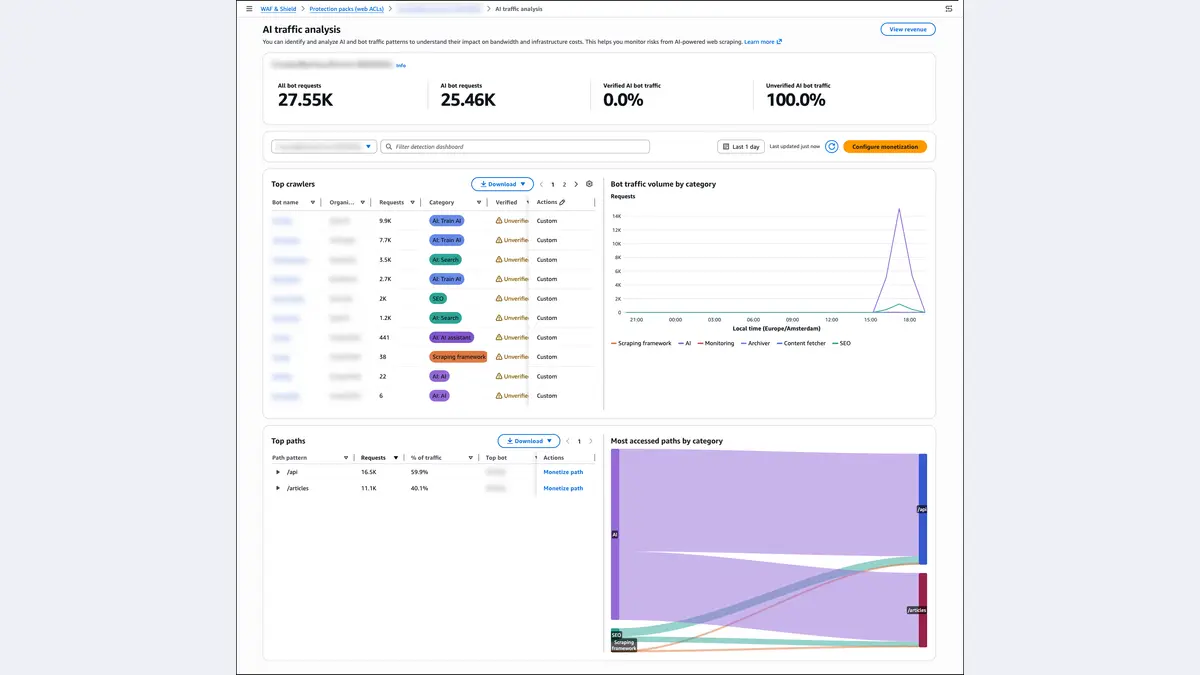
AWS WAF can now pay publishers in normal money when AI bots pay to read their content. On November 5, 2026, AWS added Stripe as a payout option for AWS WAF AI traffic monetization. AI agents still pay in USDC stablecoin, but the money now lands in your Stripe balance in your local currency, so you don't need a crypto wallet. AWS doesn't charge extra for the feature. Standard AWS WAF and Stripe processing fees apply.
This explainer covers what AI traffic monetization is, how the HTTP 402 payment flow works, what changes with Stripe, what it costs, and when to use a self-managed wallet instead.
What is AWS WAF AI traffic monetization?
AI traffic monetization launched on June 15, 2026 as part of AWS WAF Bot Control. It lets publishers, content owners and API providers put a price on access by AI bots and agents, collect the payment, and serve the content at the edge on Amazon CloudFront.
It's built on x402, an open protocol for machine-to-machine payments that uses the old HTTP status code 402 Payment Required. Before this, a website had two simple choices for AI crawlers: block them with robots.txt and WAF rules, or let them in for free. This adds a third choice: let them in if they pay.
AWS lists these capabilities (AWS News Blog launch post, What's New):
- Pricing set in the AWS WAF console or API
- Policies based on bot verification status, including Web Bot Auth signatures
- Different prices by agent identity and intent (for example, cheaper for verified AI search crawlers, more expensive for unverified or training crawlers)
- A test mode that uses blockchain testnets
- Revenue analytics next to the AI traffic analysis dashboard
What changed on November 5, 2026: Stripe payouts
At launch, the only payout option was USDC sent to a stablecoin wallet you managed on the Base or Solana blockchains. AWS's June announcement said Stripe and Machine Payments Protocol (MPP) support were "coming soon." Stripe is now live. According to AWS's November 5 announcement:
- Agents still pay in stablecoin, but the money settles in your local currency directly to your Stripe balance.
- You connect Stripe through Stripe Connect and don't need to hold stablecoins or run a crypto wallet.
- Your existing pricing and agent policies work as they are.
- Revenue from all payment providers appears in the AWS WAF console revenue analytics.
- It's available to all AWS WAF customers using CloudFront at no additional charge. Standard AWS WAF and Stripe processing fees apply. AWS doesn't give Stripe's fee rates, so check your Stripe account for them.
When AWS launched the feature in June, IT Brief reported that Stripe's Kevin Miller said "with Stripe and the Machine Payments Protocol powering AI traffic monetization, businesses can now quickly monetize" agent traffic (IT Brief UK). AWS's November note covers Stripe payouts only. It doesn't say whether MPP is now supported, so treat MPP as not yet confirmed.
How does the HTTP 402 payment flow work?
The AWS WAF Developer Guide describes the request lifecycle like this:
- Request: An AI agent requests a page, API or file on your CloudFront distribution.
- Rule match: A rule with the Monetize action matches, and the request has no valid payment, so WAF returns HTTP 402 Payment Required.
- Price quote: The 402 response includes the price per request in USDC, the accepted networks (Base, Solana), the payTo address, a timeout and the payment scheme.
- Payment authorization: The agent signs a payment authorization and sends the request again with a
payment-signatureheader. - Verification: WAF checks the authorization in the request path. If it fails, the agent gets another 402.
- Content fetch: CloudFront gets the content from your origin.
- Settlement: If the origin returns a 2xx, the payment settles on-chain through Coinbase Developer Platform's x402 facilitator.
- Response: The content is served with a
payment-responseheader confirming settlement.
Three details from the docs matter for publishers:
- No charge for failed origins: If your origin returns a 4xx or 5xx error, settlement is skipped and the agent isn't charged.
- Replay protection: Each payment authorization can only be used once. An optional idempotency extension lets agents retry for up to 15 minutes without paying twice.
- Latency: AWS says monetization "adds several seconds of additional latency" to requests that go through payment, depending on blockchain conditions. Requests without a payment attempt aren't slowed down.
AWS also says it "is not a party to or in the flow of funds" (payment docs). Settlement is handled by Coinbase's facilitator, and using it means you accept Coinbase's developer platform terms. Stripe payouts also require you to accept the Stripe Connected Account Agreement.
Wallet or Stripe? Decision table
The setup docs show the two payout options work differently in several ways (getting started guide):
Self-managed wallet (CryptoConfig) |
Stripe connected account (ConnectedAccountConfigs) |
|
|---|---|---|
| What you receive | USDC in your own Base/Solana wallet | Funds in your Stripe balance, in local currency |
| Minimum price per request | 0.001 USDC (3 decimal places) | 0.01 USDC (2 decimals), up to 999,999.99 |
| Test mode (testnets) | Yes (Base Sepolia, Solana Devnet) | No, production only |
| Who manages deposit addresses | You | Provisioned for you |
| Account type | Any wallet | Company or organization Stripe account only, not individual accounts |
| How many | One wallet per chain | One connected account |
| Mix both? | Yes, but each chain (BASE or SOLANA) can use only one of them | Same rule |
| AWS partitions | Commercial (Connected accounts are commercial-only) | Commercial only |
Rule of thumb: If you want to charge fractions of a cent per page, or you need to test on testnets first, you need a wallet. If your finance team won't hold crypto and a minimum of one cent per request is acceptable, use Stripe. You can also test the flow with a wallet in TEST mode first, then move a chain over to Stripe for production.
How to set up Stripe payouts for AWS WAF
Based on the AWS Billing guide to connected accounts and the WAF developer guide:
- Prepare a business Stripe account. Individual Stripe accounts are not supported. Each Stripe account can link to only one AWS connected account.
- Get IAM permissions. The root user must enable IAM access to Billing. Your admin then grants
payments:CreateConnectedAccount,payments:ListConnectedAccounts,payments:GetConnectedAccountandpayments:DeleteConnectedAccount. - Create the connected account. In the Billing and Cost Management console, go to Payment preferences → Connected accounts → Add connected account, give it a name (you can't change the name later) and continue to Stripe.
- Authorize in Stripe. Sign in, choose the business account, then select Connect. AWS says it doesn't receive or store your Stripe credentials.
- Check status. Wait until Account status = Active and Crypto settlement = Enabled. If it says "Action required," finish verification in the Stripe Dashboard and follow Stripe's steps to accept stablecoin payments.
- Reference it in WAF. Add a
ConnectedAccountConfigsentry with the account ARN (arn:aws:payments::<account-id>:connectedaccount/...) and per-chain prices to your web ACL'sMonetizationConfig. - Add Monetize rules for bot traffic only (see the next section), then watch the revenue analytics.
Will it block human visitors?
It can if you configure it badly. AWS warns that ordinary browsers can't complete an x402 payment, so a 402 response "will effectively block access for non-automated clients" (pricing configuration docs). AWS recommends matching on Bot Control labels such as awswaf:managed:aws:bot-control:bot, so only traffic classified as bots gets a 402.
AWS also says bot classification is "probabilistic" and may not identify every bot correctly. That's why AWS recommends test mode, and why the missing Stripe test mode matters.
You can set an action for each bot tier: Monetize, Allow (for example, a search crawler you have a deal with), Block, Count, Captcha or Challenge. The PriceMultiplier setting raises the price per rule. For example, a base price of 0.01 USDC with a multiplier of 3 means 0.03 USDC per request.
How much does AWS WAF AI traffic monetization cost?
The feature itself is free, according to the AWS WAF pricing page. You pay the normal WAF charges. Prices from AWS's pricing examples:
| Item | List price |
|---|---|
| Web ACL | $5.00 per month |
| Rule | $1.00 per month each |
| Requests | $0.60 per million |
| Bot Control (Common) | $10.00/month + $1.00 per million requests after the first 10 million free |
| Bot Control (Targeted) | $10.00/month + $10.00 per million requests after the first 1 million free |
Illustration (our estimate, not an AWS quote): Say a site has one web ACL, 10 rules, Common Bot Control and 20 million requests a month. That works out to about $5 + $10 + $12 (requests) + $10 + $10 (Bot Control overage) = roughly $47 a month in WAF costs before CloudFront and data transfer. If 100,000 of those requests were paid AI-agent requests at 0.01 USDC each, that would be 1,000 USDC gross before Stripe fees. Real revenue depends on how many agents actually pay, and no public adoption figures exist yet.
What are developers saying?
We didn't find Reddit or Hacker News threads on the Stripe update. Developer blogs reacted to the June launch:
- Andrew Kew wrote on DEV Community that "AWS just turned it into a checkbox in the WAF console," and that "the monetization layer has always been the missing piece" (DEV Community).
- SRE Luqman Hakim called it "a new cost-control lever for teams already paying for AI crawler traffic," but warned that it adds "operational surface: facilitator, chain, wallet custody, and reconciliation," and that agents not using x402 "fail closed with 402 responses" (DEV Community).
The Stripe option directly addresses Hakim's "wallet custody" concern, though Coinbase settlement and blockchain latency are still part of the flow.
Editor's take
The June launch was interesting but hard for most publishers to use, because finance teams had to hold USDC. Stripe payouts make it much easier: a mid-sized publisher already on CloudFront can now try charging AI agents without a crypto policy. The open question is demand. It only pays off if AI companies' agents actually send x402 payments instead of moving on. That's why the Allow/Count actions and analytics are probably the best place to start. Measure your AI bot traffic first, then charge for it.
If you're heading to Las Vegas, check our AWS re:Invent 2026 guide for sessions on agents and edge security. For more AWS security news, read our explainer on AWS Continuum for code vulnerabilities, and see AWS Interconnect last mile for this week's other networking launch. The same week, AWS also added Kimi K3.1 Pro to Amazon Bedrock, a model built for agent workloads.
FAQ
What is AWS WAF AI traffic monetization?
It's an AWS WAF Bot Control feature, launched June 15, 2026, that returns HTTP 402 Payment Required to AI bots and serves the content once they pay per request through the x402 protocol.
Does AWS WAF AI traffic monetization support Stripe?
Yes. Since November 5, 2026, you can connect a business Stripe account and receive payouts in your local currency instead of USDC in your own wallet.
How much does AWS WAF AI traffic monetization cost?
There's no extra charge. Standard AWS WAF charges (web ACL, rules, requests and Bot Control) and Stripe processing fees apply.
What is the minimum price per request?
0.001 USDC with a self-managed wallet, and 0.01 USDC with a Stripe connected account.
Does it work without CloudFront?
No. It needs a web ACL with CloudFront (global) scope associated with a CloudFront distribution.
Which blockchains does AWS WAF x402 support?
Base and Solana mainnet for USDC payments, plus Base Sepolia and Solana Devnet for test mode (wallet setups only).
Can I use a personal Stripe account?
No. AWS says individual Stripe accounts aren't supported. You need a Stripe account registered to a company or other organization.
Will AI traffic monetization block real users?
It can if you apply the Monetize action to all traffic. AWS recommends matching only Bot Control bot labels so human visitors aren't affected.
Sources
- AWS What's New: AWS WAF AI traffic monetization now supports fiat payouts through Stripe (Nov 5, 2026)
- AWS What's New: AWS WAF announces AI traffic monetization (Jun 15, 2026)
- AWS News Blog: AWS WAF adds AI traffic monetization capability
- AWS docs: AI traffic monetization, How it works, Getting started, Pricing configuration, Payment networks and settlement
- AWS Billing docs: Managing connected accounts
- AWS: AWS WAF pricing
- IT Brief UK: AWS WAF lets publishers charge AI bots for content
- DEV Community: AWS just made AI bot monetization a WAF setting and AWS WAF will now charge AI bots in crypto: an SRE take
Featured image: The AWS WAF AI traffic analysis console screen, from the AWS News Blog launch post. Source