Meta Ads Error #2490408: 'Performance Goal Isn't Available' — Why It Happens and How to Fix It (2026)
Fix Meta Ads error #2490408: Page likes needs the Engagement objective and Facebook Page location. Steps, compatibility table and seller advice.
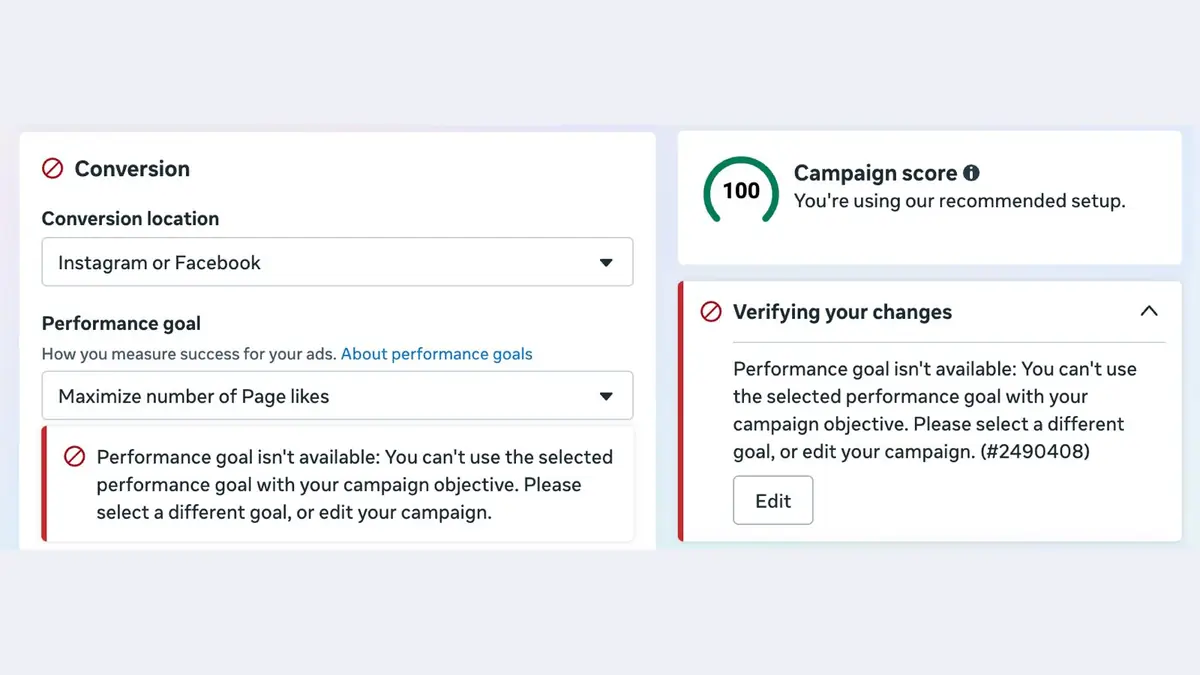
The short fix: "Maximize number of Page likes" only works when the campaign objective is Engagement and the ad set's conversion location is Facebook Page. If your conversion location says "Instagram or Facebook" (or your objective is Traffic, Sales or Awareness), Ads Manager will refuse the goal with error #2490408. Switch the conversion location to Facebook Page, or pick a goal that matches the location you have.
We saw this error ourselves in Ads Manager in India on 24 October 2026. The ad set had its conversion location set to "Instagram or Facebook" and the performance goal set to "Maximize number of Page likes". Ads Manager showed a red banner, and the campaign score in the corner still read 100, "You're using our recommended setup". More on that contradiction below.
What the error means in plain words
The full message reads: "Performance goal isn't available: You can't use the selected performance goal with your campaign objective. Please select a different goal, or edit your campaign. (#2490408)".
In plain English, the three settings you picked don't fit together. Meta builds every campaign from three layers:
- Objective (campaign level): Awareness, Traffic, Engagement, Leads, App promotion or Sales.
- Conversion location (ad set level): where you want the action to happen, such as your website, an app, a messaging app, on the ad itself, or your Facebook Page.
- Performance goal (ad set level): the exact action Meta's delivery system optimises for.
Each objective unlocks a set of conversion locations, and each location unlocks a set of goals. The goal list isn't one fixed menu, and that's exactly where people get tripped up. Jon Loomer, who writes in detail about Meta's objective structure, notes that the goals you see depend on which conversion location is selected.
We couldn't find error code 2490408 documented on Meta's Business Help Center or developer pages, and our searches turned up no public reports quoting the number. The message text is the useful part, and it describes a compatibility mismatch rather than an account or payment problem.
Why it happens
Page likes are a Facebook Page action. Instagram has followers, not Page likes. So a conversion location that covers Instagram as well as Facebook ("Instagram or Facebook") can't optimise for a goal that only exists on one of them. In our screenshot, Ads Manager let us pick the goal and then flagged it, which suggests the goal stays in the menu after you change the location and goes invalid.
The other common causes:
- Wrong objective. The goal belongs to Engagement. Under Traffic, Awareness, Leads or Sales it isn't available at all. If you copied an old campaign or picked a different objective, the old goal can carry over and break.
- Duplicated or older campaigns. Before Meta's outcome-driven objectives (ODAX), "Page likes" was its own objective. Meta's developer docs say the older objectives were retired in favour of outcome-driven ones with Marketing API v17.0. Old setups and templates can bring old combinations with them.
- Meta's shift from likes to follows. Meta deprecated the Page Insights metric labelled "Lifetime Page likes" (
page_fans) and pointed to "follows" instead, as part of the move to the new Pages experience (Coupler.io and other reporting vendors documented the November 2025 deprecation). Meta has started phasing out the Page-likes campaign goal, and we've confirmed it ourselves. In our checks in Ads Manager on 24 October 2026, "Maximize number of Page likes" still worked with the Engagement objective and Facebook Page as the conversion location, but Ads Manager rejected it in other setups, such as "Instagram or Facebook" (the error in our screenshot). Meta hasn't published a notice about this, so expect the remaining setups to narrow further.
Compatibility table
Only rows we could verify are marked as verified. Meta changes labels often, so check what your own Ads Manager shows.
| Objective | Conversion location | Performance goal | Status |
|---|---|---|---|
| Engagement | Facebook Page | Maximize number of Page likes | Verified (Jon Loomer; Meta API enums list PAGE_LIKES under OUTCOME_ENGAGEMENT) |
| Engagement | Instagram or Facebook | Maximize number of Page likes | Fails with #2490408 (seen by us, India, 24 Oct 2026) |
| Engagement | Facebook group | Maximize number of link clicks | Reported by Jon Loomer |
| Engagement | On your ad | Post engagement / video views / reach-type goals | Reported by third-party guides, not verified by us |
| Engagement | Messaging apps | Conversations | Reported by third-party guides, not verified by us |
| Traffic / Sales / Leads / Awareness | Any | Page likes | Not offered (Page likes is listed as unique to Engagement) |
How to fix it, step by step
If you want Page likes (or follows)
- Open the campaign and confirm the objective is Engagement. If it isn't, you'll have to create a new campaign, because Meta doesn't let you change the objective after publishing.
- Open the ad set and find Conversion > Conversion location.
- Select Facebook Page (not "Instagram or Facebook", not "On your ad").
- Choose your Page in the Page selector.
- Under Performance goal, select Maximize number of Page likes again. Re-selecting it after the location change clears the stale state.
- Check that the red banner is gone before you click Publish.
- If you want Instagram followers, there's no Page-likes equivalent. Look at Instagram profile-visit ads instead (Meta's developer docs cover profile-visit creatives). Check what your account offers, because we haven't tested this route ourselves.
If you actually wanted engagement, messages or traffic
Many people pick "Page likes" by habit when what they really want is something else.
- Post likes, comments, shares or video views: keep Engagement, set the location to On your ad, and choose the engagement or video goal you need.
- Messages (WhatsApp, Messenger, Instagram DMs): keep Engagement and set the location to Messaging apps.
- Clicks to a website or Amazon listing: create a Traffic campaign with the location set to Website, and optimise for link clicks or landing page views.
If you hit it through the Marketing API
The API version of the same mistake is an ad set whose optimization_goal doesn't match the campaign objective and destination_type. Meta's destination-type reference says the destination type has to fit the objective and optimisation goal, and that Meta runs a validation check on the combination. The enum values involved are OUTCOME_ENGAGEMENT, PAGE_LIKES and ON_PAGE. We couldn't find a Meta document that explicitly lists that exact trio as an allowed pair, so check it against the outcome-driven ads mapping table for your API version before you hard-code it. A Meta developer community thread shows the API returning an "Invalid parameter" error when an incompatible goal is used under OUTCOME_ENGAGEMENT.
Why does campaign score say 100 while it errors?
We don't know for certain, and Meta hasn't explained it. Our best reading is that the campaign score checks the setup against Meta's recommendations, like Advantage+ settings and broad audiences, and doesn't validate whether the objective, location and goal fit together. The validation runs separately and shows the red error. So a "100" tells you your setup follows Meta's recommendations. It doesn't tell you the campaign will publish. Fix the red banner first.
For Amazon sellers: is a Page-likes campaign even worth it?
Editor's take.
For most Amazon sellers, probably not as a main campaign. Page likes don't put anything in an Amazon cart. Meta's delivery system optimises for exactly what you ask for, and Jon Loomer warns that top-of-funnel engagement optimisation cares only about volume of those actions, not their quality. You can get cheap likes from people who will never buy.
What works better for sellers driving traffic to Amazon:
- Run Traffic campaigns to your listing or Brand Store and measure them properly. Amazon Attribution is free, measures non-Amazon channels including social, and is open to professional sellers enrolled in Brand Registry, vendors, KDP authors and agencies. Amazon's page lists India among the supported countries, along with the US, UK, Germany, Japan and others. Put an Attribution tag on your Facebook ad URL and you'll see detail page views, add-to-carts and purchases.
- Use followers as a cheap retargeting audience, not a goal. A small Page-likes or engagement campaign can help when you're launching a brand and need some social proof before running conversion-style ads. Keep the budget small and time-boxed.
- Watch the follows shift. Meta's reporting has moved from "likes" to "follows". If you report Page growth to a client or a boss, track follows from now on.
FAQ
Why does Facebook Ads say "performance goal isn't available"?
The goal you picked isn't allowed with your campaign objective or your ad set's conversion location. Change the location (for Page likes, to Facebook Page) or pick a goal the current location supports.
What is error 2490408 in Meta Ads?
It's the code that appears with the "Performance goal isn't available" message. Meta doesn't appear to document the number publicly, but the message describes a mismatch between objective, conversion location and performance goal.
Why is "Maximize number of Page likes" not available?
You need the Engagement objective with Facebook Page as the conversion location. "Instagram or Facebook", "On your ad" and any non-Engagement objective won't support it.
How do I run a Page likes campaign in 2026?
Create an Engagement campaign, set the ad set's conversion location to Facebook Page, choose your Page, then select "Maximize number of Page likes". It was available when we checked on 24 October 2026.
Can I get Instagram followers with a Page likes campaign?
No. Page likes are a Facebook Page action. For Instagram, look at profile-visit style ads instead.
Is this error only in India?
We saw it in India, but nothing about it looks regional. The rule that a goal must match its objective and location applies everywhere, and the API validation rule is global. We found no reports tying it to a specific country.
Does the campaign score of 100 mean my campaign is fine?
No. The score reflects Meta's recommended settings. It doesn't check whether your goal fits your objective. Fix any red error before you publish.
Is Meta removing the Page likes goal?
Yes, partly. We've confirmed that Meta is phasing out the Page-likes ad goal: on 24 October 2026 it still worked with the Engagement objective and Facebook Page as the conversion location, but was blocked in other setups. Meta has also replaced "Page likes" with "follows" in Page Insights reporting. Meta hasn't published an official notice, so if you rely on this goal, plan for Page follows or engagement goals instead.
Sources
- Jon Loomer, Meta Campaign Objectives: Best Practices: https://www.jonloomer.com/meta-campaign-objectives-best-practices/
- Jon Loomer, How Meta Could Improve Campaign Construction Flow: https://www.jonloomer.com/how-meta-could-improve-campaign-construction-flow/
- Meta for Developers, Ad Set Destination Type: https://developers.facebook.com/docs/marketing-api/adset/destination_type/
- Meta for Developers, Smart Suggested Ads reference (enums): https://developers.facebook.com/documentation/ads-commerce/marketing-api/reference/ad-account/smart_suggested_ads
- Meta for Developers, Facebook Page visit (profile-visit ads): https://developers.facebook.com/documentation/ads-commerce/marketing-api/ad-creative/profile-visit-ads/facebook-page-visit
- Meta Developer Community thread on incompatible optimisation goals: https://developers.secure.facebook.com/community/threads/1281370366608704
- Coupler.io, Facebook Page Insights likes metrics deprecation: https://help.coupler.io/article/621-facebook-page-insights-impressions-and-other-metrics-deprecation-nov-15-2025
- Amazon Ads, Amazon Attribution: https://advertising.amazon.com/solutions/products/amazon-attribution
Featured image: Screenshot: 9to5Amazon, Meta Ads Manager (India, 24 Oct 2026). Source